
Field Service Form Builder & Mobile Forms
Create digital forms in minutes, attach them to Work, and capture the information your teams need from the field. Build forms manually or use AI to get started faster.
From Form Creation to Field Completion
Build the information you need, capture it as Work is completed, and keep field data connected to your operations.
Build Faster
Create forms from scratch, use existing forms, or let AI help build the structure so you can get started faster.
Capture in the Field
Give field teams the forms they need as part of their assigned Work, including photos, signatures and structured data.
Use the Data
Review submitted information, generate PDFs, keep records with the Work, and connect field data to the rest of your workflow.
Dusk FSM Form Builder
Build Forms Your Way
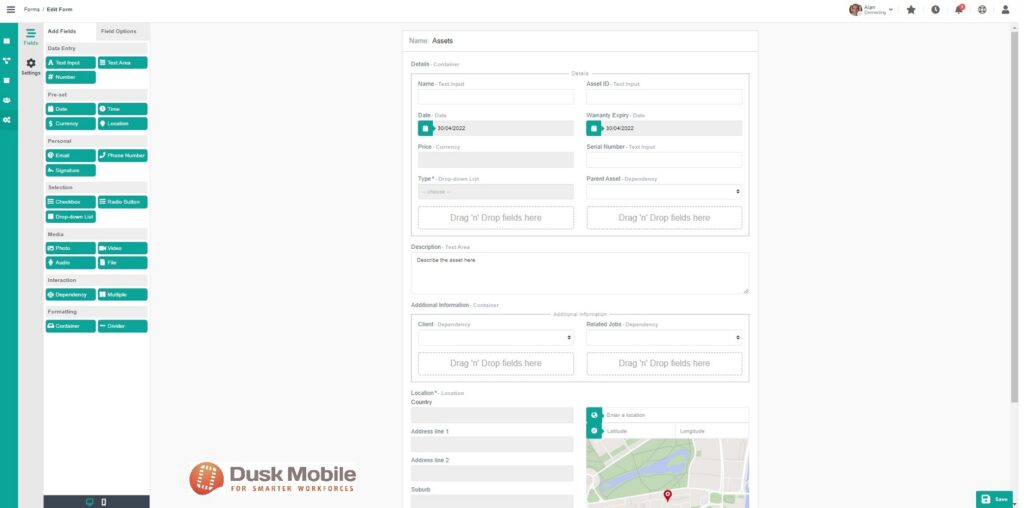
Create the forms your operation needs without relying on developers or specialist configuration. Build forms for field Work, Assets, Customers and other operational processes using the Dusk FSM Form Builder.
Add the fields you need, control how information is captured, and update forms as your requirements change.
- Drag-and-drop form creation
- Conditional fields and questions
- Reusable forms and templates
- Photos, signatures and structured field data
- Forms for Work, Assets and Customers
AI Form Builder
Describe the Form You Need. Let AI Get You Started.
Start with a blank form, describe what you need in natural language, or upload an existing PDF. Dusk FSM can use AI to create the initial form structure, ready for you to review and customize in the Form Builder.
Describe It
Tell Dusk FSM what information you need to capture using a natural-language description of the form and its purpose.
Or Upload a PDF
Already have a paper or PDF form? Upload it and let AI create a digital starting point instead of rebuilding everything manually.
Review & Refine
Review the generated form, then add, remove, reorder or configure fields using the standard Dusk FSM Form Builder.
AI gives you the starting point. You stay in control.
AI-generated forms are designed to accelerate setup rather than lock you into the result. Review the generated structure and tailor fields, options and conditions to match the way your team works.
Forms in the Field
Attach Forms to Work
Attach the right Forms to Work so field teams have the information they need when completing it in the field.
Forms & Templates
Create and Reuse Form Templates
Build reusable Forms and templates so teams can capture information consistently across different types of Work.
Mobile Forms
Complete Forms Anywhere, Even Offline
Give field teams access to the Forms attached to their Work in the Dusk FSM mobile app. Capture structured information, photos and signatures from the field, with offline support for teams working outside reliable coverage.
iOS & Android
Access assigned Work and complete Forms from the Dusk FSM mobile apps for iOS and Android.
Work Offline
Continue capturing information when connectivity is limited and sync field data when coverage returns.
Photos & Signatures
Capture supporting photos and signatures as part of the Form and keep them connected to the field record.
Consistent Field Data
Use structured fields, required information and form logic to capture consistent data across your field operation.
From Field to Office
Turn Field Data into Action
Completing a Form shouldn't be the end of the process. Keep captured information connected to the Work, make completed Forms available to the people who need them, and use field data in the workflows that follow.
Dusk FSM brings field capture and operational workflows together so information collected in the field doesn't have to be manually re-entered elsewhere.
Explore Dusk FSM Forms documentation →Review Completed Forms
Review captured Form information and keep completed records connected to the Work they belong to.
Generate & Share PDFs
View completed Forms as PDFs for consistent records, reporting and sharing with the people who need the information.
Edit When Permitted
Allow completed Form data to be reviewed and edited where your Form configuration and permissions allow it.
Dusk FSM + HubSpot
Bring Field Information Back into HubSpot
Use the Dusk FSM HubSpot integration to bring relevant information captured through field workflows back into HubSpot, helping office teams keep customer and service information connected without unnecessary re-entry.
Build Your First Field Form
Start with Dusk FSM and create Forms that connect your office, field teams and Work in one place.
-

How Fleet Data Improves Field Service Scheduling and Dispatch
Fleet data and field service scheduling are changing at the same time. Fleet systems once
-

How Real-Time Visibility Reduces Field Service Escalations
A technician can arrive within the agreed service window, complete the job properly, and s
-

The Best Field Service Automation Is the Kind You Never Notice
How AI-driven workflow automation creates more consistent field operations without replaci